Before this, the only reliable way to print at home was for me to upload PDFs over SFTP to my CUPS server and print them from there.
This worked great, assuming you were me.
My wife, quite reasonably, wanted to print like a normal person. From her device, over Wi-Fi. Without opening a ticket with the household infrastructure department.
And, also quite reasonably, she has observed before that I make everything complex.
She is not wrong. But also: printers.
Printers are where good intentions go to die. Try negotiating with Wi-Fi Direct, vendor mobile apps, multicast discovery, IoT isolation, TLS, and whatever the Android print stack is thinking about today. And no, I did not want every random IoT device on my network to have a chance to read all my printed documents.
So this became a three-day expedition. It was awesome.
The Rules
I did not want the printer on the normal client network.
The printer belongs in an IoT subnet. The humans live in other subnets. The printer should still appear automatically when someone taps print.
At home, that means three broad subnets/VLANs: iot for devices that should not be trusted too much, access for normal client devices, and mgmt for the admin/control side of things. My wife’s devices, and basically every normie device that should be able to print without knowing what a VLAN is, live in access.
That was the goal:
- keep the printer isolated;
- avoid per-device manual setup;
- avoid random vendor cloud or Wi-Fi Direct magic;
- expose printing through IPPS (because TLS, more on that shortly);
- make Android, tablets, and normal computers discover it.
The amount of infrastructure required to make something look normal is, of course, the fun part.
The Printer Had To Look Like A Printer
Before getting to the broken bit, it helps to explain how a computer even finds a printer.
On a normal home network, the answer is usually “multicast and vibes.” The clean version is mDNS plus DNS-SD. A client asks the local network (IPv4 224.0.0.251, UDP port 5353): “who provides _ipps._tcp.local?” Devices answer with DNS-looking records that say: “this printer exists, this is its hostname, this is its port, these are its attributes.”
The _ipps bit is IPP over TLS. IPP is the Internet Printing Protocol: basically HTTP, but fancier and printer-shaped. It lets clients talk to printers or print servers, submit jobs, ask for printer capabilities, and check job state. IPPS is the same idea, but wrapped in TLS.
The clients I cared about live in slightly different printing cultures.
Linux is the least surprising one for me: CUPS talks IPP, Avahi advertises services, and the whole thing is very much in the “plain standards glued together” camp.
Apple has AirPrint, which is also in the Bonjour/DNS-SD/IPP family. Also, Apple kept CUPS alive for a long time because macOS needed printing to exist, which is one of those rare cases where a giant vendor’s incentives aligned nicely with my home lab.
Android is messier. There is the built-in print service (BIPS), there are vendor plugins like HP’s, there is Mopria, and there are all the usual proprietary app-shaped traps. Some of those paths probably work fine if your printer lives on the same flat Wi-Fi as everything else and you are willing to accept whatever discovery method the app wants.
Windows has its own printer discovery and sharing traditions around SMB and friends. There used to be Google Cloud Print, which is now mostly a ghost story.
I wanted the good ol’ standards path: local discovery, IPP/IPPS, and TLS.
My family mostly uses Android, so that was my focus for this project. BIPS is picky. It needs a complete DNS-SD answer in a particular shape that was not at all easy to figure out.
Part of the debugging was reading the BIPS source code to understand what kind of service shape Android was willing to accept. The frustrating thing was not finding a single obvious “nope” error. It was realizing that incomplete or weird-looking DNS-SD data can simply make the printer disappear from the UI.
- it should advertise
_ipps._tcp, with SRV, TXT, and address records that form one coherent printer; - return an address that belongs to the client subnet, not the printer’s real IoT address, otherwise Android just ignores it (no errors);
- do not point Android at some unrelated FQDN or .local name and expect Android to collaborate;
- keep a stable UUID, because the relay is a logical printer from the client’s point of view.
That is fine when everything is in one subnet. Not my case.
There are ways to move discovery across subnets. You can try to reflect multicast across subnets. I tried using the os-mdns-repeater plugin in my OPNsense router, with no success. Without transforming the content of the response, I would still fall into the issues above. It also did not give me the filtering control I wanted, and I did not like the idea of random IoT devices poisoning my other subnets.
So I needed a bridge.
CUPS was already the thing that knew how to talk to the printer. I don’t need discovery for CUPS, just a firewall rule to let it connect to the printer’s port 443. CUPS can publish shared printers through Avahi, and Avahi is the common mDNS/DNS-SD implementation sitting underneath that.
Avahi can listen on multiple interfaces. The annoying part is that a single Avahi daemon publishing a service is not a great fit when the service needs to look different depending on which subnet is asking. I needed the access subnet to see a printer-shaped thing that belonged to access, and same for mgmt. I also did not want to change my network layout to expose multiple VLANs to my CUPS server.
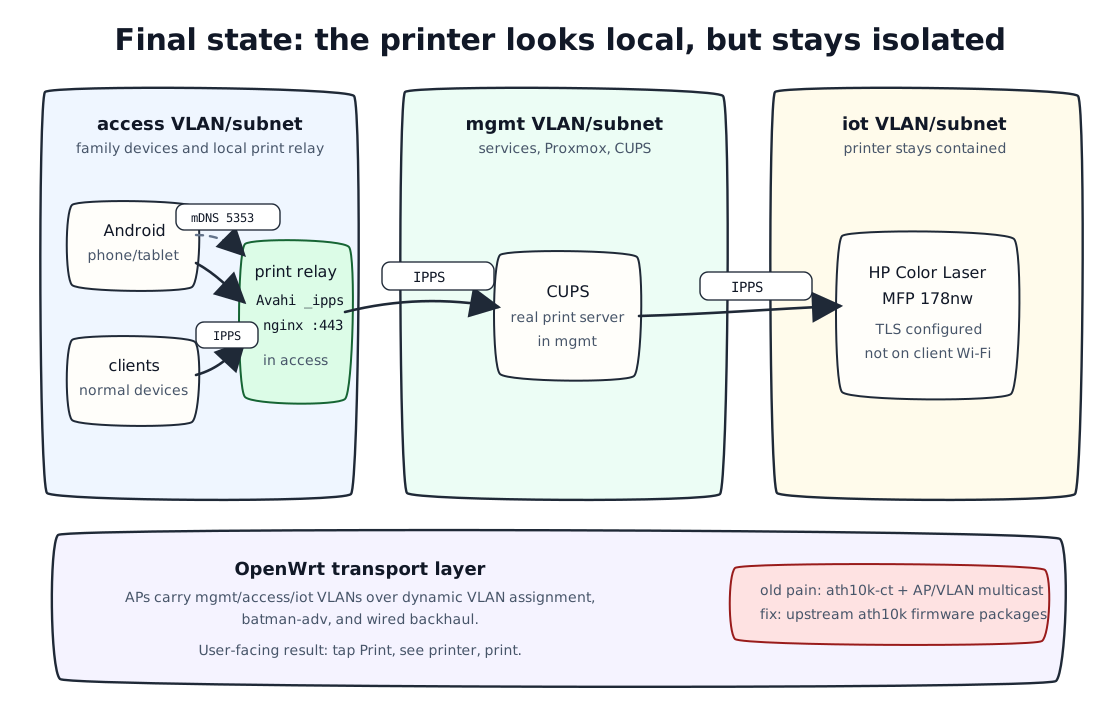
That pushed me toward a relay option: a lean VM in my Proxmox rig that would advertise the printer locally in the access subnet with Avahi, terminate IPPS locally with nginx, and proxy the actual print traffic onward to CUPS in the mgmt subnet.
The Pleasure and The Pain
Coming from Nix/NixOS, I needed to make this setup more declarative.
My NixOS infrastructure is organized with Clan, which I use as a way to describe machines and services as reusable roles. So instead of leaving this as “that one VM where I manually made Avahi and nginx behave”, I turned it into a Clan service in my public infra repo.
The print service now has three roles:
server: runs CUPS, ensures the printer queue exists, and owns the real printer configuration;relay: runs Avahi and nginx, advertises the logical IPPS printer locally, and proxies traffic back to the server;client: marks machines that should get the client-side printing bits.
The service code is in modules/servers/print/clan-print.nix, and the concrete instance wiring is in modules/deployments/clan/instances/print.nix. That split is important to me: one file describes what “printing infrastructure” means, the other says which machines play which parts at home.
It was all so cleanly falling into place, until I realized: my freaking phone is not finding the damn printer! And most bizarre: when I moved from my bedroom to my office, it started picking it up!
The Actual Villain
The Wi-Fi side of my house is not a single consumer router doing everything.
I run OpenWrt images for several APs, configured from Nix too, using Dewclaw. At the time of this debugging session, the relevant setup had four APs in the house: two GL.iNet Flint 2 units and two AVM Fritz Repeater 3000 units. The wireless network uses dynamic VLAN assignment, with mgmt, access, and iot carried as separate VLANs. The APs also use batman-adv for the mesh/backhaul pieces, with VLANs bridged over bat0.
The OpenWrt image definitions live in packages/openwrt/default.nix, the shared VLAN/batman-adv logic is in packages/openwrt/openwrt.nix, and the AVM device-specific package override is in packages/openwrt/avm-fritz-repeater3000.nix.
After all of that, the relay was correct and the behavior was still inconsistent.
One Android phone worked. A tablet behaved differently. The printer could appear and disappear. Moving devices between APs changed the result.
That was the clue.
The final problem was not Avahi, nginx, CUPS, OPNsense, the relay, or Android’s printer metadata.
It was multicast handling on OpenWrt access points using ath10k-ct firmware with dynamic VLAN/AP-VLAN interfaces.
The APs in question were AVM Fritz Repeater 3000 devices with Qualcomm/Atheros radios. The fix was to replace the CT firmware packages with the upstream OpenWrt firmware packages:
extra-packages = [
  "-ath10k-firmware-qca4019-ct"
  "-ath10k-firmware-qca9984-ct"
  "ath10k-firmware-qca4019"
  "ath10k-firmware-qca9984"
];
Small note for future me: the -package-name syntax here is not UCI. It is the OpenWrt ImageBuilder/package-list convention for removing packages from the image package set.
The trail that pushed me in this direction was old and indirect, but useful: an OpenWrt forum thread about clients being isolated with dynamic VLANs, older ath10k/dynamic-VLAN reports like greearb/ath10k-ct#13 and openwrt/openwrt#7459, and especially greearb/ath10k-ct#177, which talks about AP/VLAN and broadcast breakage.
After replacing the firmware, clients started receiving the multicast answers. This problem must have been quietly haunting my house for at least a year since I installed OpenWrt.
The final working shape looked like this:
The Real Win
I like that this problem was not simple.
It touched Android internals, DNS-SD, Avahi, nginx, CUPS, IPPS, OpenWrt, dynamic VLANs, AP firmware, NixOS roles, and the deeply important question of how a thing should fail.
This also happened while I was trying a YouTube detox.
Not in a dramatic, “I deleted the internet and became a monk” way. More like: the phone is dangerous for my attention, so I keep it away. At home I use a Bigme HiBreak Pro 6 Android e-ink phone instead, which is slower, calmer, and much less likely to become a two-hour video-shaped hole in the evening.
That changed the texture of this project.
Normally, this kind of problem can sit around forever. I know roughly what needs to happen, I know it will involve packet captures and weird edge cases, and I also know there are easier dopamine sources nearby.
This time I had enough quiet to stay with the problem.
Codex helped too, I must admit. It helped by keeping the next experiment small. Run this capture. Check this source code. Compare these packets. Try this in the access point. Helping me realize that I should stop assuming nginx is guilty just because it is nearby.
That matters when the problem has ten plausible causes.
The YouTube detox did not make me more virtuous. It just made this kind of deep rabbit hole easier to enter and easier to stay inside.
But the better outcome is that the complexity is no longer just complexity. It is mapped. It is partly declarative. It has packet captures behind it. It has a known firmware fix. It has fewer ghosts.
I still made everything even more complex, but I do understand it now.
And yes, my wife can print.